01
Local AI denoise
An on-device model built for speech strips steady background noise — fan, AC, mains hum, hiss and room tone — without shipping your audio anywhere.
- Runs entirely on your Mac
- Tuned for spoken word
- One strength slider
MAC · ONE-TIME PURCHASENow on the Mac App Store
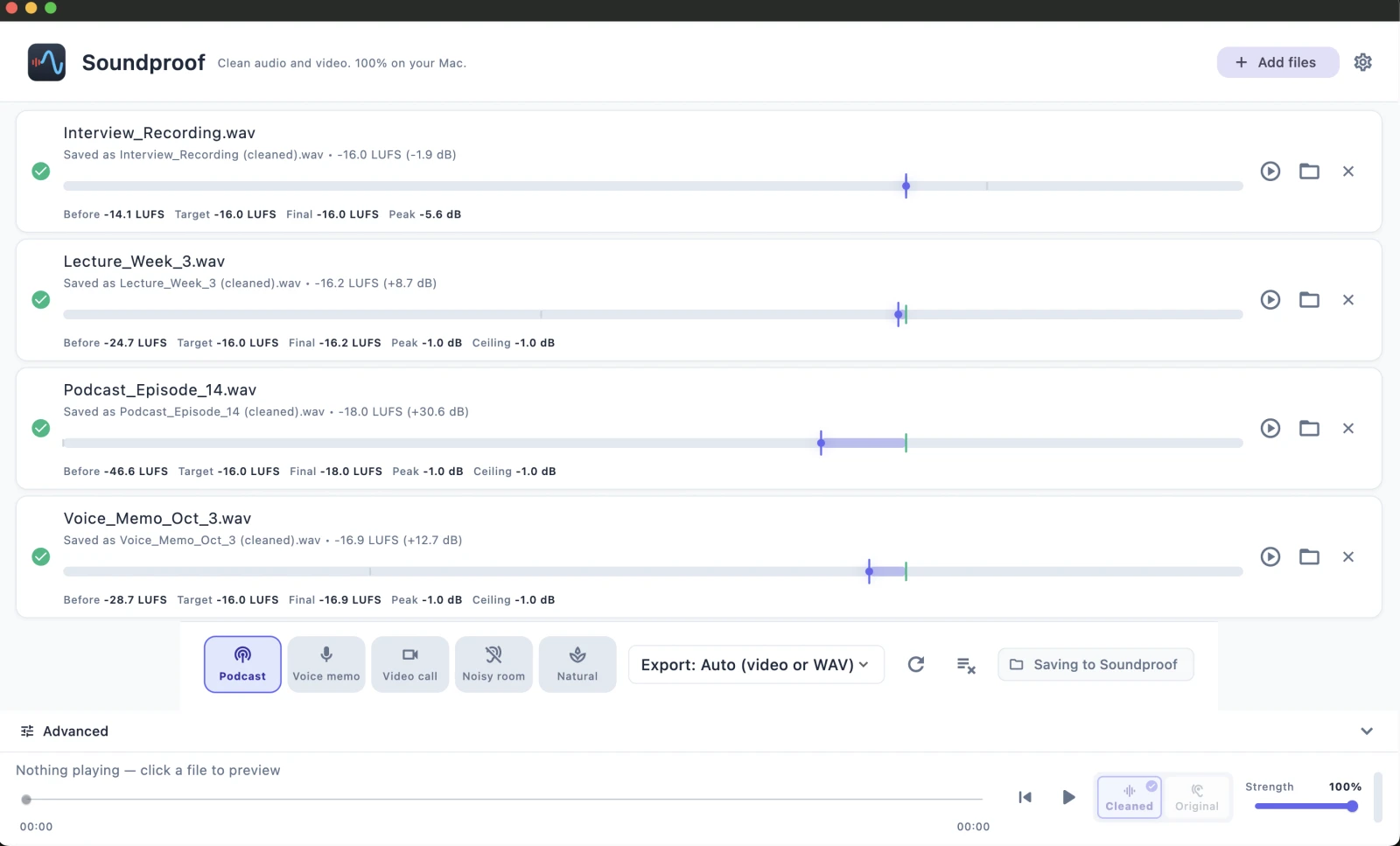
Drop in a voice memo, interview, podcast take, lecture or video. Soundproof removes fan, AC, hum and hiss, then exports a cleaned file right next to the original. Nothing ever leaves your Mac.
No account. No uploads. No subscription.
Local AI denoise · Audio & video · Batch cleanup · LUFS-normalized, share-ready output · Exports cleaned video, WAV, M4A or MP3 · macOS 13.4+ on Apple Silicon & Intel
This is the actual, unedited audio output processed directly by the Soundproof app. Play the cleaned take, then hold to compare.
PRIVATE BY DESIGN · NOTHING LEAVES YOUR MAC
Soundproof cleans audio locally with an on-device AI model. No upload, no cloud queue, no account — the file you drop in never touches a server.
That matters for confidential interviews, legal and HR recordings, therapy notes and anything you simply would not paste into a website. Offline works too.
WHAT IT DOES
Soundproof does more than denoise. It runs the full chain a good recording needs — then hands you a file that's ready to publish, not just quieter.
01
An on-device model built for speech strips steady background noise — fan, AC, mains hum, hiss and room tone — without shipping your audio anywhere.
02
Feed it a recording or a video clip. For video, Soundproof cleans the audio and remuxes it back — same picture, quieter track, no re-editing.
03
After denoising, Soundproof gates, compresses and LUFS-normalizes so playback is consistent and level — with a peak guard so nothing clips.
04
Start from a preset tuned for the job — Podcast, Voice memo, Video call or Keep music — then adjust the strength if you want to.
05
Drop a whole folder and clean it in one pass. Export next to the original as cleaned video, WAV, M4A or MP3 — your files are never overwritten.
HOW IT WORKS
Voice memos, interviews, podcast takes, lectures, screen recordings, video clips. Soundproof accepts common audio and video formats and queues them up for batch cleanup.
Hear the cleaned result instantly, then hold to hear the original — the before/after moment that tells you in two seconds whether it worked. No noise profile to draw, no settings to learn.
Soundproof writes name (cleaned).ext beside the source and never overwrites your files. Read the loudness meter — before LUFS, target, final LUFS, gain and peak status — at a glance.
HONEST ABOUT LIMITS
Most denoisers over-promise. Soundproof is built for steady background noise behind a voice, and we'd rather tell you where it is most reliable and where results vary.
Not sure if your recording is a good fit? The free download cleans your own files first — try it before you buy.
HOW WELL IT WORKS
Objective signal-to-noise improvement (SI-SDR gain) measured across noise types and difficulty. Higher is better. We include the weak case too, because leaving it out would be lying.
| Noise type | Gain at 5 dB SNR (hard) | Gain at 15 dB SNR (mild) |
|---|---|---|
| Mains hum | +10.0 to +13.3 dB | +6.2 to +10.1 dB |
| Hiss (white) | +10.9 to +12.3 dB | +7.2 to +8.3 dB |
| Fan / room (pink) | +8.6 to +10.2 dB | +4.8 to +6.3 dB |
| Babble (background voices) | −0.2 to +3.4 dB | +2.4 to +3.1 dB |
Read this honestly: Soundproof is excellent on hum, hiss and fan noise. Babble and background voices are less predictable — sometimes improved, sometimes still audible — which is exactly why we show that case. Processing runs at roughly 9× realtime on a single CPU thread. Method and test harness are open for inspection.
HOW IT COMPARES
Every tool here removes background noise. They differ on whether your recording leaves your Mac, whether video is supported at all, and whether you pay once or keep paying. Rows where Soundproof loses are in the table too.
| Soundproof | Hush | Adobe Enhance | Krisp | Audacity | |
|---|---|---|---|---|---|
| Runs on your Mac (no upload) | Yes | Yes | No — cloud | Yes | Yes |
| Account required | None | None | Adobe account | Account | None |
| Cleans video files | Yes (remux) | Audio only | No | No | No |
| Batch a folder | Yes | — | No | No | Manual |
| Loudness (LUFS) normalize | Yes | — | Partial | No | Manual |
| De-reverb (room echo) | No | Yes | Yes (strong) | — | Limited |
| Works on live calls | No | No | No | Yes | No |
| Price | $49.99 one-time | $89.99 one-time | Free (cloud) | Subscription | Free |
Read this honestly: if you need de-reverb, Hush does it and Soundproof does not. If you need noise cancelled on a live call rather than on a file you already have, you want Krisp or Apple's built-in Voice Isolation. If your recording can go to the cloud and it's audio-only, Adobe Enhance is free — see the offline alternatives. And Audacity is free forever if you don't mind sampling a noise profile for every file. Soundproof is the pick when the recording must stay on your Mac, the file is video, or there are twenty of them.
PRICING
Download and clean your own files before paying a cent. When it's earned it, unlock everything for one flat price — no subscription, ever.
Get it whichever way you prefer, try three free exports on your own recordings, then unlock inside Soundproof if it works for you. Same app, same on-device cleanup, same one-time $49.99 unlock either way.
Mac App Store · Apple handles payment & updatesDirect download · signed, notarized, updates in-app
Free
The full engine, so you can prove it on your own recordings first.
Soundproof — Lifetime
Everything unlocked, forever. Pay once and it's yours.


One-time purchase, not a subscription. Try the full engine free first — buy once you know it works.
Need licenses for a team? See team purchasing →
BEFORE YOU ASK